Choose Your Language: International US DE ES FR
Hello Guest Login Here or

Top Process Monitor 4.0

Top Process Monitor Description

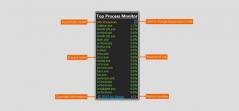
Top Process Monitor - This simple Sidebar gadget shows the top processes on your system.

This simple Sidebar gadget shows the top processes on your system.

Top Process Monitor is a very useful desktop gadget that was designed in order to show you the processes that are consuming the most CPU, Memory (Working Set), IO (Bytes read/written) and others. It does not require any 3rd party applications. Resizable! Save settings to file. (File will be created - Path: %USERPROFILE%\AppData\Roaming File: gadgetname_Settings.ini). Color changeable for all gadget's elements, include background.

Top Process Monitor 4.0 is licensed as Freeware for the Windows operating system / platform. Top Process Monitor is provided as a free download for all software users (Freeware).

Top Process Monitor User Reviews (0)

No reviews yet, be the first to add a review and we'll give you some extra points.
Top Process Monitor Download Notice
Top Process Monitor is periodically updated by FileCluster but you may encounter situations when the software informations are slightly out-of-date, the producers of Top Process Monitor can modify the product without notifying us. Top Process Monitor 4.0 is currently the last updated version of the software. All rights for Top Process Monitor are belong to the developer, Igor Igogo Bushin.

Any form of support or software problems regarding Top Process Monitor will be addressd to its developers. Please be aware that we do NOT provide Top Process Monitor cracks, serial numbers, registration codes or any forms of pirated software downloads.
Top Process Monitor Related Software
Fstfix GUI 1.4.2
Graphical User Interface for Fstfix
0 / 88
Aerofoil 1.5.1
An efficient utility to improve notebook battery performance.
8 / 854
SAEAUT SMS Library STANDARD 1.01.00
Sending receiving SMS from/to your applications over LAN and Internet
1 / 69
Onde Screen Rulers for Mac 1.11
Onde all-in-one screen rulers is highly configurable measuring utility for Mac
0 / 30
TOSHIBA Keyboard Backlight 1.0.0.1
Enable the backlight function on your Toshiba system.
0 / 39
Sky JUMP 1.2.2
Edit and generate spatial datasets with the help of this tool.
0 / 108
QuickHide Stable
QuickHide hides taskbar processes, programs and applications quickly.
0 / 50
OEM Configurator 2
Easily customize the system information.
0 / 70
GPXTrackCropper 0.2.1
Tool created to crop GPX files.
0 / 81
Pakrat 0.95
View, add, and delete files that are stored inside BSP files.
1 / 114