Choose Your Language: International US DE ES FR
Hello Guest Login Here or

Hide Files 3.4

Hide Files Description

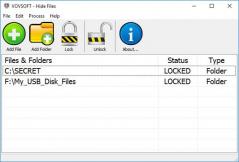
Hide Files - Program to hide any number of files/folders

You have any files or programs that you don't want to share with other or they contain financial and tax information, passwords, personal letters and emails, private images, and other confidential or personal
data. But typically, computer files and folders have not security protection so the best way to protect them is to make files or folders invisible for another's eyes. Hide Files makes hidden any files and folders (or whole Windows folder or even all computer disks).
Hide Files allows you to select any folders (and sub folders with files) of your choice to protect as hidden files and folders. You can select any folders on your computer or drag-and-drop the desired folders from
Windows Explorer into the Hide Files window. In one mouse click the folders selected become invisible. Once files or folders are hidden, it is impossible to find them, or access and remove any file. Unhiding
files or folders is as easy as hiding them - just one mouse click and they are visible and accessible to you again. If program folder or whole disks are hidden, itself program or Windows will continue to work normally.
Hide Files is protected by a password and hotkey that you can change or remove at any time. You can use this security features to protect Hide Files from unauthorized start.
Hide files features:
- Any number of files and folders may be hidden at the same time.
- Program does not modify file system structure.
- NTFS, FAT32 and FAT file systems are supported.
- Hotkey and password protection for program start.
- Stealth Mode - program itself can be hidden.
- Hide Files will hide any folders including Windows, Windows System folders and Windows partition root folders without damage of operational system itself (i.e. your computer will continue to work normally).
- Invisibility of hidden files over network.
- Locking of hidden files or folders to prevent access to them via list of most recently used files.

Hide Files 3.4 is licensed as Shareware for the Windows operating system / platform. Hide Files is provided as a free to try download for all software users (Shareware).

Hide Files User Reviews (0)

No reviews yet, be the first to add a review and we'll give you some extra points.
Hide Files Download Notice
Hide Files is periodically updated by FileCluster but you may encounter situations when the software informations are slightly out-of-date, the producers of Hide Files can modify the product without notifying us. Hide Files 3.4 is currently the last updated version of the software. All rights for Hide Files are belong to the developer, Spydex Inc.

Any form of support or software problems regarding Hide Files will be addressd to its developers. Please be aware that we do NOT provide Hide Files cracks, serial numbers, registration codes or any forms of pirated software downloads.
Hide Files Related Software
File Information Editor 2.01
Edit Comments, Subject, etc. in spreadsheet.
3 / 225
Aomei Dynamic Disk Manager Pro Edition 1.0
Feature-rich dynamic disk/volume management software and magic disk converter.
1 / 295
Advanced Directory Printer 1.81
Print or save your file/folder lists.
20 / 434
Quick Recovery for Macintosh 12.05.08
Best macintosh data recovery software & tools
1 / 220
Compare Files 1.1
A WPF Utility to compare two files.
2 / 319
Bad CD/DVD Recovery 2.40
Bad CD/DVD Recovery is the data recovery
2 / 717
Sync Last Files Professional 3.0.3
Folders synchronization using flash disk
2 / 198
PA Storage Monitor Pro 3.3
Storage analysis and reporting
1 / 191
Hard Drive Inspector 3.83
Hard drive health monitoring utility
3 / 259
REMO Recover (Mac) - Media Edition 1.0.0.1
REMO Recover (Mac) - Media Edition
1 / 64