Login
Memtest86 4.20
-
License:
Freeware
-
Latest Version:
4.20
-
Editors' Review:
Not yet reviewed
-
Updated:
Jan 26, 2011
- Publisher:
-
Platform:
Windows
- Category:
- Subcategory:
-
File size:
0.063 Mb
-
Downloads:
3,683
Author's Description
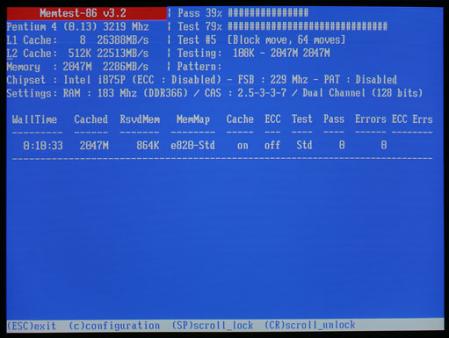
Memtest86 - RAM tester for x86 architecture computers
Memtest86 is a free stand alone memory test for computers with x86 architecture.
Memtest86 was designed as a superior alternative to BIOS-based memory tests, that are a quick, depthless check and miss a lot of failures very often. Memtest86 is free for both private and commercial use with no restriction except those imposed by the GNU public license (GPL). IT can also be included in publications and software compilations.
Windows installation instructions
- Download the Pre-Compiled Windows package to create a boot-able floppy disk or an ISO (zip-version) to create a boot-able CD-ROM.
- Extract the downloaded file by right-clicking on it and choosing the “Extract All” option.
- Now you will have to choose where the files should be extracted.
- To build a bootable floppy disk go to the folder containing the extracted files and click the Install icon. After the Install is complete, the floppy disk will appear to be unformatted by Windows.
- To build a bootable CD-ROM use a CD burning application to create an image from the extracted ISO file.
Note: Memtest86 is a stand alone program, therefore it works outside the operating system and can be used on any computer regardless of what operating system is installed on it (if any).
Memtest86 is a free stand alone memory test for computers with x86 architecture.
Memtest86 was designed as a superior alternative to BIOS-based memory tests, that are a quick, depthless check and miss a lot of failures very often. Memtest86 is free for both private and commercial use with no restriction except those imposed by the GNU public license (GPL). IT can also be included in publications and software compilations.
Windows installation instructions
- Download the Pre-Compiled Windows package to create a boot-able floppy disk or an ISO (zip-version) to create a boot-able CD-ROM.
- Extract the downloaded file by right-clicking on it and choosing the “Extract All” option.
- Now you will have to choose where the files should be extracted.
- To build a bootable floppy disk go to the folder containing the extracted files and click the Install icon. After the Install is complete, the floppy disk will appear to be unformatted by Windows.
- To build a bootable CD-ROM use a CD burning application to create an image from the extracted ISO file.
Note: Memtest86 is a stand alone program, therefore it works outside the operating system and can be used on any computer regardless of what operating system is installed on it (if any).
Memtest86 4.20 is licensed as Freeware for the Windows operating system / platform. Memtest86 is provided as a free download for all software users (Freeware).
User Reviews (0)
No reviews yet, be the first to add a review and we'll give you some extra points.
Related Searches
Download Notice
Memtest86 is periodically updated by FileCluster but you may encounter situations when the software informations are slightly out-of-date, the developer can modify this product without notifying us. Version [4.20] is currently the latest updated version of the software.
Any form of support or software problems will be addressd directly to its developers, MemTest86. Please be aware that we do NOT provide Memtest86 cracks, serial numbers, registration codes or any forms of pirated software downloads.
Related Software
PerfView 1.4.1.0
A performance-analysis tool that helps isolate CPU and memory-related performance issues.
1 / 76