Login
Windows 7 USB / DVD Download Tool 1.0.30.0
-
License:
Freeware
-
Latest Version:
1.0.30.0
-
Editors' Review:
Not yet reviewed
-
Updated:
Dec 12, 2009
- Publisher:
-
Platform:
Windows
- Category:
- Subcategory:
-
File size:
2.54 Mb
-
Downloads:
2,291
Windows 7 USB / DVD Download Tool Description
Windows 7 USB / DVD Download Tool - Back up your Windows 7 image (ISO)
A useful utility for backing up your Windows 7 image (ISO) installation file
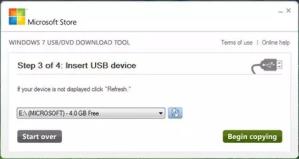
When you purchase Windows 7 from Microsoft Store, you have the option to download an ISO file or compressed files. The Windows 7 USB/DVD Download tool allows you to create a copy of your Windows 7 ISO file on a USB flash drive or a DVD. To create a bootable DVD or USB flash drive, download the ISO file and then run the Windows 7 USB/DVD Download tool. Once this is done, you can install Windows 7 directly from the USB flash drive or DVD.
The ISO file contains all the Windows 7 installation files combined into a single uncompressed file. When you download the ISO file, you need to copy it to some medium in order to install Windows 7. This tool allows you to create a copy of the ISO file to a USB flash drive or a DVD. To install Windows 7 from your USB flash drive or DVD, all you need to do is insert the USB flash drive into your USB port or insert your DVD into your DVD drive and run Setup.exe from the root folder on the drive.
Note: You cannot install Windows 7 from the ISO file until you copy it to a USB flash drive or DVD with the Windows 7 USB/DVD Download tool and install from there.
The copy of the ISO file that the Windows 7 USB/DVD Download tool creates is bootable. Bootable media allows you to install Windows 7 without having to first run an existing operating system on your machine. If you change the boot order of drives in your computer's BIOS, you can run the Windows 7 installation directly from your USB flash drive or DVD when you turn on your computer. Please see the documentation for your computer for information on how to change the BIOS boot order of drives.
You may make one copy of the ISO file on a disc, USB flash drive or other media in order to install the software on a computer. Once you have installed the software on a computer, the license terms that accompany the software apply to your use of the software and replace these terms.
The license terms for Windows 7, once accepted, permit you to make one copy of the software as a back-up copy for reinstallation on the licensed computer. If you do not delete the copy of the ISO file you made to install the software on your computer, then the copy of the ISO file constitutes your back-up copy.
Requirements:
- Pentium 233-megahertz (MHz) processor or faster (300 MHz is recommended)
- 50MB of free space on your hard drive
- DVD-R drive or 4GB removable USB flash drive
- Microsoft .NET Framework v2 must be installed.
- Microsoft Image Mastering API v2 must be installed.
A useful utility for backing up your Windows 7 image (ISO) installation file
When you purchase Windows 7 from Microsoft Store, you have the option to download an ISO file or compressed files. The Windows 7 USB/DVD Download tool allows you to create a copy of your Windows 7 ISO file on a USB flash drive or a DVD. To create a bootable DVD or USB flash drive, download the ISO file and then run the Windows 7 USB/DVD Download tool. Once this is done, you can install Windows 7 directly from the USB flash drive or DVD.
The ISO file contains all the Windows 7 installation files combined into a single uncompressed file. When you download the ISO file, you need to copy it to some medium in order to install Windows 7. This tool allows you to create a copy of the ISO file to a USB flash drive or a DVD. To install Windows 7 from your USB flash drive or DVD, all you need to do is insert the USB flash drive into your USB port or insert your DVD into your DVD drive and run Setup.exe from the root folder on the drive.
Note: You cannot install Windows 7 from the ISO file until you copy it to a USB flash drive or DVD with the Windows 7 USB/DVD Download tool and install from there.
The copy of the ISO file that the Windows 7 USB/DVD Download tool creates is bootable. Bootable media allows you to install Windows 7 without having to first run an existing operating system on your machine. If you change the boot order of drives in your computer's BIOS, you can run the Windows 7 installation directly from your USB flash drive or DVD when you turn on your computer. Please see the documentation for your computer for information on how to change the BIOS boot order of drives.
You may make one copy of the ISO file on a disc, USB flash drive or other media in order to install the software on a computer. Once you have installed the software on a computer, the license terms that accompany the software apply to your use of the software and replace these terms.
The license terms for Windows 7, once accepted, permit you to make one copy of the software as a back-up copy for reinstallation on the licensed computer. If you do not delete the copy of the ISO file you made to install the software on your computer, then the copy of the ISO file constitutes your back-up copy.
Requirements:
- Pentium 233-megahertz (MHz) processor or faster (300 MHz is recommended)
- 50MB of free space on your hard drive
- DVD-R drive or 4GB removable USB flash drive
- Microsoft .NET Framework v2 must be installed.
- Microsoft Image Mastering API v2 must be installed.
Windows 7 USB / DVD Download Tool 1.0.30.0 is licensed as Freeware for the Windows operating system / platform. Windows 7 USB / DVD Download Tool is provided as a free download for all software users (Freeware).
Windows 7 USB / DVD Download Tool User Reviews (0)
No reviews yet, be the first to add a review and we'll give you some extra points.
Windows 7 USB / DVD Download Tool Download Notice
Windows 7 USB / DVD Download Tool is periodically updated by FileCluster but you may encounter situations when the software informations are slightly out-of-date, the producers of Windows 7 USB / DVD Download Tool can modify the product without notifying us. Windows 7 USB / DVD Download Tool 1.0.30.0 is currently the last updated version of the software. All rights for Windows 7 USB / DVD Download Tool are belong to the developer, Microsoft.
Any form of support or software problems regarding Windows 7 USB / DVD Download Tool will be addressd to its developers. Please be aware that we do NOT provide Windows 7 USB / DVD Download Tool cracks, serial numbers, registration codes or any forms of pirated software downloads.
Windows 7 USB / DVD Download Tool Related Software
Safari Backup 2011 2.0.6.19
Backup your Safari profile quickly and easily with Safari Backup 2011
3 / 81