Choose Your Language: International US DE ES FR
Hello Guest Login Here or

O&O DiskImage Server Edition 6.0 Build 439

O&O DiskImage Server Edition Description

O&O DiskImage Server Edition - Prevent data loss simply and securely!

Prevent data loss simply and securely!

Unforeseen server downtime can drastically impair a company's productivity. That is why failed servers must be put back into operation as quickly as possible. To achieve this it is vital that regular data backups are carried out.

O&O DiskImage also backs up data from damaged storage volumes for recovery purposes. The forensic backup incorporates all readable data, regardless of whether the file system is partitioned, partition tables are damaged or files have simply been deleted. As images can be mounted as virtual drives, there is no danger of the original data being affected when making a data recovery attempt, for example with our award-winning O&O RescueBox or O&O MediaRecovery.

For use in emergencies, you don't even have to instal O&O DiskImage to backup or recover your data. The Start CD included in delivery allows you to recover data from damaged systems or make the system re-usable again with the Bare-Metal Option. During the start procedure, Windows drivers can also be loaded with ease. Unlike competing products, O&O DiskImage offers you with this function access to volumes on even the most recent and exotic of hardware.

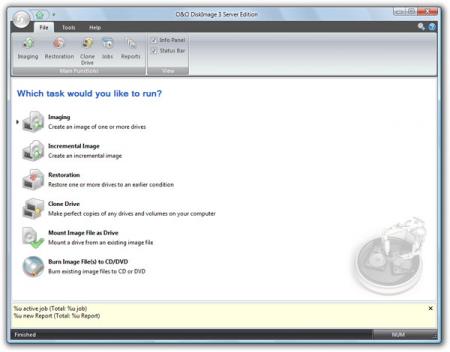
With O&O DiskImage Server Edition you will be able to create images of entire computers or single drives.

O&O DiskImage Server Edition features :

Data Backup technology from the defragmentation editor's choice:
- A string of successful solutions in data security and system management across company networks form the basis of O&O DiskImage Server Edition. As millions of our happy customers worldwide will testify, O&O has over the years gained considerable expertise in the secure handling of data. By using this experience, O&O has now developed a product that enables you to image and restore your entire hard disk. O&O DiskImage Server Edition supports all important functions and combines this with a user friendly interface for the quick and simple imaging or restoration of data.

Hot imaging with no downtime:
- Until recently the main problem with imaging productive systems was the connected downtime. In order to backup data consistently, running operations and applications had to be stopped until the imaging was complete. With the capacity of today's mass storage systems, the maintenance work required to carry out a backup can easily take up half of an entire working day. O&O DiskImage Server Edition has a high-performance Hot Imaging Mechanism that makes sure data is backed-up precisely as it was at the start of the imaging procedure: changes made to the data by users have no affect on the image procedure at hand. The existing fi le system and the application environment have therefore no infl uence on the process. Only by harnessing this technology can consistent system backups be created, whilst at the same time ensuring that the system runs without interruption and is continuously available.

Specially designed for server environments:
- When O&O DiskImage was developed, the aim in mind was how to use modern systems effi ciently without placing too much strain on older hardware. O&O DiskImage Server Edition offers fully comprehensive support for 64 Bit Server operating systems, Storage Management based on dynamic storage volumes and of course fail-safe RAID confi gurations.

Choose between various types of backups:
- O&O DiskImage offers you both complete and incremental imaging. With the complete imaging option, you can choose between a space-saving used sector image and an all-encompassing forensic image for the purposes of a data recovery - for example when using products from the award-winning O&O RescueBox. With an incremental image, you save both time and space: this method only backs-up data that has been changed since the last image was made. In every image file, be that an incremental image or one split onto several storage volumes, all important information is saved. Even when single image fi les are lost, you can still carry out a partial data recovery of data that is still available.

Compression and higher-grade encryption:
- O&O DiskImage Server Edition offers a speedy and effi cient compression process specially optimized for Microsoft Windows. The high-performance encryption with the AES Algorithm provides well-proven security against unwanted access to your valuable data. It is only possible to read an encrypted image with the use of your personal password. Compression and encryption grades can be set individually for each different image. The read-out of general information regarding images is still possible, even where the password is not available.

Splitting Image Files:
- Images can be split into either traditional portions (CD, DVD etc.) or also on userdefined scales. An automatic split is also possible, when for example the target drive is full or the maximum file size for the file system has been reached. Compression and encryption for every image can be individually selected too.

System recovery with the Start CD:
- Our BareMetal Technology, with help from O&O DiskImage Server Edition, allows you to bring a dead system back to life without prior installation. For this purpose we have placed a bootable CD at your disposal. The CD is based on Microsoft Windows Vista and contains all the standard drivers from Windows, so that for most systems there is no need for additional and often complicated loading of drivers. Additional drivers can also be loaded after starting, for example for Storage Controller or Network cards, with the help of an Assistant. Thanks to the familiar Windows interface, restoration and backup with the bootable CD are child's play.

Mount an image as a virtual drive in Explorer:
- Both complete and incremental images can be mounted as virtual drives. This enables you to access individual fi les or directories without having to restore the entire image. The virtual drive behaves just like a normal device, and is read-only. Access to your backed-up data is no different to accessing a normal hard disk - regardless of whether you go through Windows Explorer or other programs.

Requirements:

- To install under Windows there must be at least 256MB of RAM available. A minimum of 512 MB is required for running O&O Start CD.
- In order to install and register O&O DiskImage you must be a member of a local administrator group or possess an equivalent level of privileges. If you are a domain administrator, then you must possess the adequate level of administrative privileges.

Limitations:

- Nag screen
- 30 days trial period

O&O DiskImage Server Edition 6.0 Build 439 is licensed as Trial for the Windows operating system / platform. O&O DiskImage Server Edition is provided as a free to try download for all software users (Trial).

O&O DiskImage Server Edition User Reviews (0)

No reviews yet, be the first to add a review and we'll give you some extra points.
O&O DiskImage Server Edition Download Notice
O&O DiskImage Server Edition is periodically updated by FileCluster but you may encounter situations when the software informations are slightly out-of-date, the producers of O&O DiskImage Server Edition can modify the product without notifying us. O&O DiskImage Server Edition 6.0 Build 439 is currently the last updated version of the software. All rights for O&O DiskImage Server Edition are belong to the developer, O&O Software GmbH.

Any form of support or software problems regarding O&O DiskImage Server Edition will be addressd to its developers. Please be aware that we do NOT provide O&O DiskImage Server Edition cracks, serial numbers, registration codes or any forms of pirated software downloads.
O&O DiskImage Server Edition Related Software
BadBlocked FileCopier 1.03 Build 20050921
Copy damaged files or folders
2 / 252
Backup Plus 7.7.1
Create easy to manage Windows Backups.
2 / 379
IDrive Classic 3.4.1
Automated protection for your critical data.
4 / 100
Windows Registry SWEEP (Cleaner) 2012.02
Latest Windows Registry Cleaner for XP/Vista
1 / 217
FavBackup 2.1.2
Easily backup data related to your browser
9 / 467
FileFort Free File Backup Software 3.11
Automatically backup your critical data.
2 / 167
Recover4all Professional 2.53
Recover deleted files under Windows.
2 / 653
JustBoot Disk Backuper 7.0
Secure your system and data against disasters
3 / 228
Pen Drive Data Unformat Tool 3.0.1.5
Pen drive data rescue tool salvage lost data
3 / 207
Recovery Toolbox for CD Free 1.1.12
Opens not accessible, damaged optical discs
2 / 221