Login
Screenshot Captor 4.03.00
-
License:
Freeware
-
Latest Version:
4.03.00
- Editors' Review:
-
Updated:
Apr 22, 2013
- Publisher:
-
Platform:
Windows
- Category:
- Subcategory:
-
File size:
7.5 Mb
-
Downloads:
954
Author's Description
Screenshot Captor - Capture tons of screenshots quickly
Screenshot Captor is a free desktop screen capture utility with an essential but useful collection of image editing and sharing functions.
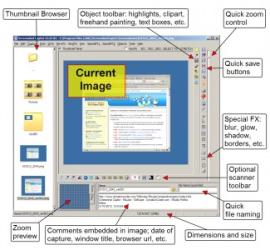
Screenshot Captor’s simple, intuitive interface includes multiple screen capture modes, a comprehensive set of scanner acquisition tools, image editing functions and sharing possibilities.
Features:
- Runs unobtrusively in the system tray.
- Designed for easily performing screen captures.
- Support for multiple monitors is enabled.
- Scanner acquisition and scanner image correction tools are provided.
- Provides capture functionality for Windows 7 partial transparency effects.
- Scrolling capture function.
- Upload functionality for screenshots is available for several popular image hosting services such as flickr, FTP, imageshack and others.
- Includes amazing ragged edge splicing effects.
- Embedding options for text comments, captions and watermarks.
- Multiple capture modes are available such as desktop, region, active window, scrolling capture…etc.
- Great ragged edge splicing effects.
- Automated functions are available for file naming, renaming, conversion and file versioning.
- Built-in special effects include pixilation, active window enhancement, ragged edge splicing and others.
- Thumbnail maker and watermarker functions.
Screenshot Captor is a free desktop screen capture utility with an essential but useful collection of image editing and sharing functions.
Screenshot Captor’s simple, intuitive interface includes multiple screen capture modes, a comprehensive set of scanner acquisition tools, image editing functions and sharing possibilities.
Features:
- Runs unobtrusively in the system tray.
- Designed for easily performing screen captures.
- Support for multiple monitors is enabled.
- Scanner acquisition and scanner image correction tools are provided.
- Provides capture functionality for Windows 7 partial transparency effects.
- Scrolling capture function.
- Upload functionality for screenshots is available for several popular image hosting services such as flickr, FTP, imageshack and others.
- Includes amazing ragged edge splicing effects.
- Embedding options for text comments, captions and watermarks.
- Multiple capture modes are available such as desktop, region, active window, scrolling capture…etc.
- Great ragged edge splicing effects.
- Automated functions are available for file naming, renaming, conversion and file versioning.
- Built-in special effects include pixilation, active window enhancement, ragged edge splicing and others.
- Thumbnail maker and watermarker functions.
Screenshot Captor 4.03.00 is licensed as Freeware for the Windows operating system / platform. Screenshot Captor is provided as a free download for all software users (Freeware).
User Reviews (0)
No reviews yet, be the first to add a review and we'll give you some extra points.
Related Searches
Download Notice
Screenshot Captor is periodically updated by FileCluster but you may encounter situations when the software informations are slightly out-of-date, the developer can modify this product without notifying us. Version [4.03.00] is currently the latest updated version of the software.
Any form of support or software problems will be addressd directly to its developers, DonationCoder.com. Please be aware that we do NOT provide Screenshot Captor cracks, serial numbers, registration codes or any forms of pirated software downloads.
Related Software
Clarify 1.2.1 Build 13
Turn screenshots into beautiful documents in minutes with no hassle at all.
5 / 151
Absolute 3D Photo Design Centre 3.1
Program creates animated images from pictures 3D buttons and figures
3 / 318
Pixy Color 6.2.0
Easily see at anytime the color of any pixel in RGB, HTML, VDS, HEX, CHEX and CMY.
0 / 30