Login
PDF Editor 3.3
-
License:
Demo ($79)
-
Editors' Review:
Not yet reviewed
- User Reviews:
-
Video Review:
Video Not Available -
Updated:
Dec 06, 2011
- Publisher:
-
Platform:
Windows
- Category:
-
File size:
5.3 Mb
-
Downloads:
4,134
PDF Editor Description
PDF Editor - Edit PDF files now! Write text, delete text
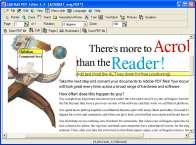
Edit PDF files now! You can write annotations, add text, change the text (correct spelling errors) or delete words completely. Now you can also add or delete pictures and vector graphics and add text in any font you want! With the 11 new tools you can move and zoom the text and pictures and you can edit text blocks, insert empty lines or change the line breaks freely just like a text editor or word processor. Version 2.0 is able to underline, highlight and strikeout text and edit bookmarks too. Change the order of the pages or delete pages. Also you can hide the information on a page so that it is invisible in the Acrobat Reader but can be unhidden later. You can change the page size or move the content. Add stamps like "Confidential" or "Top secret". The source code of the page (a language like HTML) is editable for you. Use the program to read and write encrypted pdf files. The program leaves the layout
untouched after saving if you don't want to change it. New in version 2.5: 1)New function: File/Reduce file size 2)Stamp functions 3)Page numbers and headers/footers function 4)Search and replace for the document text and search only function 5)Multiple form fields can be selected New functions for form fields 6) Better file repair function for corrupted pdf files 7)Faster drawing of vector objects 30% faster 8)Free highlighting function without the need for text objects (scanned file) 9)Split text objects into parts (split table rows into columns) New in version 2.6: 1) New form elements (pro version): Listbox, Drop-Down box, Radiobutton 2) New annotation fields: rectangle, ellipse, line, pencil 3) Rotate form fields 4) Setup the view of the file when opening the pdf file (for example show/hide bookmarks) 5) Page setup function for a scaled printout 6) A double click on a page under "Pages" opens the page in the Editor
Edit PDF files now! You can write annotations, add text, change the text (correct spelling errors) or delete words completely. Now you can also add or delete pictures and vector graphics and add text in any font you want! With the 11 new tools you can move and zoom the text and pictures and you can edit text blocks, insert empty lines or change the line breaks freely just like a text editor or word processor. Version 2.0 is able to underline, highlight and strikeout text and edit bookmarks too. Change the order of the pages or delete pages. Also you can hide the information on a page so that it is invisible in the Acrobat Reader but can be unhidden later. You can change the page size or move the content. Add stamps like "Confidential" or "Top secret". The source code of the page (a language like HTML) is editable for you. Use the program to read and write encrypted pdf files. The program leaves the layout
untouched after saving if you don't want to change it. New in version 2.5: 1)New function: File/Reduce file size 2)Stamp functions 3)Page numbers and headers/footers function 4)Search and replace for the document text and search only function 5)Multiple form fields can be selected New functions for form fields 6) Better file repair function for corrupted pdf files 7)Faster drawing of vector objects 30% faster 8)Free highlighting function without the need for text objects (scanned file) 9)Split text objects into parts (split table rows into columns) New in version 2.6: 1) New form elements (pro version): Listbox, Drop-Down box, Radiobutton 2) New annotation fields: rectangle, ellipse, line, pencil 3) Rotate form fields 4) Setup the view of the file when opening the pdf file (for example show/hide bookmarks) 5) Page setup function for a scaled printout 6) A double click on a page under "Pages" opens the page in the Editor
PDF Editor 3.3 is licensed as Demo for the Windows operating system / platform. PDF Editor is provided as a free to try download for all software users (Demo).
PDF Editor User Reviews (0)
No reviews yet, be the first to add a review and we'll give you some extra points.
PDF Editor Related Searches
PDF Editor Download Notice
PDF Editor is periodically updated by FileCluster but you may encounter situations when the software informations are slightly out-of-date, the producers of PDF Editor can modify the product without notifying us. PDF Editor 3.3 is currently the last updated version of the software. All rights for PDF Editor are belong to the developer, CAD-KAS GbR.
Any form of support or software problems regarding PDF Editor will be addressd to its developers. Please be aware that we do NOT provide PDF Editor cracks, serial numbers, registration codes or any forms of pirated software downloads.
PDF Editor Related Software
Photo Effect Studio 1.0.1
create unlimited photo effects and share your vision with the world!
2 / 108