Login
CINEMA 4D R14.025 Build RC62983
-
License:
Demo ($995)
-
Latest Version:
R14.025 Build RC62983
-
Editors' Review:
Not yet reviewed
-
Updated:
Sep 20, 2012
- Publisher:
-
Platform:
Windows
- Category:
- Subcategory:
-
File size:
1904 Mb
-
Downloads:
2,081
Author's Description
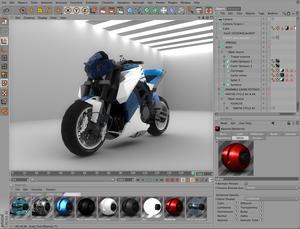
CINEMA 4D - Easiest to use professional 3D application
A program that is known as the easiest to use professional 3D application
Top quality made even better. Once again, CINEMA 4D convinces with its forward-looking innovation, ease of use and legendary stability.
The actual release of CINEMA 4D offers you more possibilities than ever before, whether for film, television, advertising, scientific simulations, architecture, product design or any other field that demands professional results. Its one-of-a-kind modular system and the ease with which it can be learned make CINEMA 4D the ideal tool for any purpose and every budget
The basic application already contains all functions needed to create high-end 3D images and animations ? start the application and start working, it's that easy. For those whose work demands more than the basic application, MAXON provides numerous CINEMA 4D modules that can be integrated seamlessly.
A total of 10 modules are available with which you can expand the functionality of your CINEMA 4D application to fit your needs. You can save an extra 20%, compared with the individual purchase of modules, when you buy one of the available bundles.
As a 3D artist you know that fast, easy workflow is the key to meeting deadlines and beating the competition. CINEMA 4D's interface takes advantage of non-modal managers for realtime feedback and robust OpenGL support to provide an efficient foundation, while allowing you to customize almost every aspect of the interface itself to achieve the fastest and easiest workflow possible.
This version will give you the maximum space possible to work on your scenes or models. Little amenities have also been added that make working with CINEMA 4D more pleasant. For example, items can now be renamed directly in the Object Manager or Material Editor.
CINEMA 4D's completely customizable interface puts every tool within easy reach. You can easily redesign layouts, palettes and even menus to match your personal workflow or particular tasks, and easily switch between layouts and menus with the click of a button. With cascading shortcuts, you can assign a shortcut key to any command and even group commands under a single shortcut. The global popup provides easy access to frequently used commands, while the HUD puts valuable scene data and tool options right on top of the scene.
You're an artist, and it's important that your interface looks good in addition to working well. CINEMA 4D's schemes allow you to easily change the look and feel of the interface to match your style or mood. Use one of several included schemes or design your own and share it with other users. CINEMA 4D's fast, stylish interface fits you. You're a 3D artist in the real world, and it's time you start working faster - and smarter.
CINEMA 4D features:
- Images for background templates can be dragged directly into a 2D view.
- Noise shader display in OpenGL mode.
- Any CINEMA 4D command can be dragged into the editor view to be used as a HUD element.
- Navigation speed setting for tablet users.
- Option for saving objects polygonally in the native CINEMA 4D format.
- New Auto-Save function.
- Native CINEMA 4D file format can be opened directly in Allplan 2008.
- New DWG import format.
- Selection assistance in the HUD.
- New HUD commands.
- Commands with which existing objects or materials can be put out as XRefs.
- Camera rotation can be fine-tuned via a manually adjustable pivot point.
- Objects and materials can be saved to separate scenes using the XRef function.
- The last eight tools used are displayed
- Tool for interactively placing lights (and reflections).
- Selecting all Phong Edge Breaks.
- New Structure command for connecting Points or Edges.
- New Structure command for removing edges in consideration of the Phong Angle.
- Command to spin selected edges.
- A new Animation Palette option that makes it easier for users of other applications to use CINEMA 4D.
- Scalable mini F-Curves.
Requirements:
- 1024 MByte RAM
- Single Core CPU with 2GHz
- OpenGL graphics card
- DVD ROM drive
- QuickTime 7
Limitations:
- Scenes, movies, textures and preset libraries and browser catalogs cannot be saved. Preferences and layouts can be saved.
- Sketch and Toon cannot render images with a resolution greater than 640x480 pixels.
- The NET Render module is not included in the demo version.
A program that is known as the easiest to use professional 3D application
Top quality made even better. Once again, CINEMA 4D convinces with its forward-looking innovation, ease of use and legendary stability.
The actual release of CINEMA 4D offers you more possibilities than ever before, whether for film, television, advertising, scientific simulations, architecture, product design or any other field that demands professional results. Its one-of-a-kind modular system and the ease with which it can be learned make CINEMA 4D the ideal tool for any purpose and every budget
The basic application already contains all functions needed to create high-end 3D images and animations ? start the application and start working, it's that easy. For those whose work demands more than the basic application, MAXON provides numerous CINEMA 4D modules that can be integrated seamlessly.
A total of 10 modules are available with which you can expand the functionality of your CINEMA 4D application to fit your needs. You can save an extra 20%, compared with the individual purchase of modules, when you buy one of the available bundles.
As a 3D artist you know that fast, easy workflow is the key to meeting deadlines and beating the competition. CINEMA 4D's interface takes advantage of non-modal managers for realtime feedback and robust OpenGL support to provide an efficient foundation, while allowing you to customize almost every aspect of the interface itself to achieve the fastest and easiest workflow possible.
This version will give you the maximum space possible to work on your scenes or models. Little amenities have also been added that make working with CINEMA 4D more pleasant. For example, items can now be renamed directly in the Object Manager or Material Editor.
CINEMA 4D's completely customizable interface puts every tool within easy reach. You can easily redesign layouts, palettes and even menus to match your personal workflow or particular tasks, and easily switch between layouts and menus with the click of a button. With cascading shortcuts, you can assign a shortcut key to any command and even group commands under a single shortcut. The global popup provides easy access to frequently used commands, while the HUD puts valuable scene data and tool options right on top of the scene.
You're an artist, and it's important that your interface looks good in addition to working well. CINEMA 4D's schemes allow you to easily change the look and feel of the interface to match your style or mood. Use one of several included schemes or design your own and share it with other users. CINEMA 4D's fast, stylish interface fits you. You're a 3D artist in the real world, and it's time you start working faster - and smarter.
CINEMA 4D features:
- Images for background templates can be dragged directly into a 2D view.
- Noise shader display in OpenGL mode.
- Any CINEMA 4D command can be dragged into the editor view to be used as a HUD element.
- Navigation speed setting for tablet users.
- Option for saving objects polygonally in the native CINEMA 4D format.
- New Auto-Save function.
- Native CINEMA 4D file format can be opened directly in Allplan 2008.
- New DWG import format.
- Selection assistance in the HUD.
- New HUD commands.
- Commands with which existing objects or materials can be put out as XRefs.
- Camera rotation can be fine-tuned via a manually adjustable pivot point.
- Objects and materials can be saved to separate scenes using the XRef function.
- The last eight tools used are displayed
- Tool for interactively placing lights (and reflections).
- Selecting all Phong Edge Breaks.
- New Structure command for connecting Points or Edges.
- New Structure command for removing edges in consideration of the Phong Angle.
- Command to spin selected edges.
- A new Animation Palette option that makes it easier for users of other applications to use CINEMA 4D.
- Scalable mini F-Curves.
Requirements:
- 1024 MByte RAM
- Single Core CPU with 2GHz
- OpenGL graphics card
- DVD ROM drive
- QuickTime 7
Limitations:
- Scenes, movies, textures and preset libraries and browser catalogs cannot be saved. Preferences and layouts can be saved.
- Sketch and Toon cannot render images with a resolution greater than 640x480 pixels.
- The NET Render module is not included in the demo version.
CINEMA 4D R14.025 Build RC62983 is licensed as Demo for the Windows operating system / platform. CINEMA 4D is provided as a free to try download for all software users (Demo).
User Reviews (0)
No reviews yet, be the first to add a review and we'll give you some extra points.
Related Searches
Download Notice
CINEMA 4D is periodically updated by FileCluster but you may encounter situations when the software informations are slightly out-of-date, the developer can modify this product without notifying us. Version [R14.025 Build RC62983] is currently the latest updated version of the software.
Any form of support or software problems will be addressd directly to its developers, MAXON Computer Inc. Please be aware that we do NOT provide CINEMA 4D cracks, serial numbers, registration codes or any forms of pirated software downloads.
Related Software
HitFilm Standard 1.1.3109.41259
Revolutionary new visual effects and video editing software.
0 / 185
Virtual Plastic Surgery 1.0.0.5
VPS is a software for digital photo to simulate plastic surgery.
0 / 127