Choose Your Language: International US DE ES FR
Hello Guest Login Here or

SmartCode VNC Manager Standard Edition 6.8.11.0

SmartCode VNC Manager Standard Edition Description

SmartCode VNC Manager Standard Edition - Powerful and an easy to use remote VNC servers administration tool.

Powerful and an easy to use remote VNC servers administration tool.

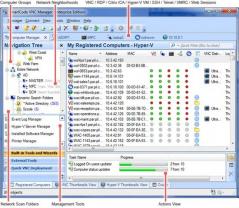
SmartCode VNC Manager is an easy to use remote administration tool which allows you to connect, view and take remote control of any computers running VNC or Windows Terminal Servers.

It provides an easy to use intuitive GUI interface and unique features that can significantly improve the user productivity of network administrators.

SmartCode VNC Manager Standard Edition is a tool that administrate VNC servers.

SmartCode VNC Manager Standard Edition features :

- Latest RealVNC 4.1 and TightVNC 1.3 distributions are fully supported
- VNC deployment wizard. Allows remote installation and un-installation of TightVNC, RealVNC and UltraVNC based servers
- "Reset Remote VNC Server Password" wizard. Allows you to mass reset password on a remote VNC servers
- Customizable "External tools" allows you to easily launch other applications while working in the VNC Manager. You can specify arguments and a working directory when launching the tool
- Integrated Windows domain and workgroup computers browser. With ability to browse computer shares, open Computer Manager snap-in and Windows Explorer
- Windows domain/workgroup and IP address (up to class B network) scan. Allows scan for active VNC servers. Includes support for multiple ports scan
- VNC Manager can connect to UltraVNC server using Windows NTLM authentication mode
- TightVNC and UltraVNC file transfers support
- UltraVNC Repeater proxy suport
- VNC Manager allows system administrators to Reboot or Shutdown remote computer
- Thumbnail view allows multiple computers to be monitored on-screen at once. Thumbnail view has support for connection pooling mode. Items added to the thumbnail view can be restored upon application restart
- Customizable "Action scripts" allows to perform some action before connection to VNC or RDP server will be established or when you will be disconnected from the server. For instance, you can establish a dial-up connection using VBscript based file
- VNC Manager has built-in support for HTTP and SOCKS5 proxies
- Start/Stop/Restart the remote VNC Windows service
- Server Status scan. Checks for VNC server status. Can be started manually or set to update server status via time interval
- Capture and save screenshots of remote VNC server screen. Also, in the Thumbnails View - user can take screenshots via user configured time intervals
- VNC and Windows RDP viewer window stretching. Remote server screen will always fit in the viewer window no matter what screen size the remote computer has
- Export servers list to a Tab/comma separated file
- User can change GUI style - Available styles are Office 2003, Visual Studio 2005 and Windows XP
- Automatic search folders provide a quick filter for connected VNC and RDP sessions
- Default session. Allows you to set default setting for newly registered servers
- Default password. You can specify a default password to connect with, or a specific one for each connection
- Active sessions can be viewed in separate windows or in Tab view panels
- VNC Manager does not require VNC viewer to be installed. It uses an ActiveX VNC viewer control developed by SmartCode
- VNC Manager can send Wake-on-LAN "magic packet" that allows a network professional to remotely power on a computer or to wake it up from sleep mode
- VNC Viewer Connection Bar for a quick access to the main functions (available in the full screen mode only)

Limitations:

- 14 days trial
- Some options are disabled

SmartCode VNC Manager Standard Edition 6.8.11.0 is licensed as Trial for the Windows operating system / platform. SmartCode VNC Manager Standard Edition is provided as a free to try download for all software users (Trial).

SmartCode VNC Manager Standard Edition User Reviews (0)

No reviews yet, be the first to add a review and we'll give you some extra points.

SmartCode VNC Manager Standard Edition Related Searches

SmartCode VNC Manager Standard Edition Download Notice
SmartCode VNC Manager Standard Edition is periodically updated by FileCluster but you may encounter situations when the software informations are slightly out-of-date, the producers of SmartCode VNC Manager Standard Edition can modify the product without notifying us. SmartCode VNC Manager Standard Edition 6.8.11.0 is currently the last updated version of the software. All rights for SmartCode VNC Manager Standard Edition are belong to the developer, SmartCode Solutions.

Any form of support or software problems regarding SmartCode VNC Manager Standard Edition will be addressd to its developers. Please be aware that we do NOT provide SmartCode VNC Manager Standard Edition cracks, serial numbers, registration codes or any forms of pirated software downloads.
SmartCode VNC Manager Standard Edition Related Software
DDWidget Free 1.4
Automate file transfers with Drop Boxes
1 / 451
Net Profile Switch 7.0
Switch network settings, network switcher
1 / 253
GFI EventsManager 2011
Network-wide event log management
1 / 244
Easy RSS2Email 2.02
Creating and sending emails from RSS feeds.
1 / 247
Twins WebNews 1.0
Easy to use RSS and ATOM news reader!
1 / 206
Free MSN Emoticons Pack 5 1.5
Free MSN Emoticons Pack
2 / 263
Network Device Explorer 1.1
Manage network devices from your PC
1 / 229
UltraAdmin 6.0.80
Domain and Active Directory management tool.
1 / 356
Disk Auditor Net 2.2
Network file utility.
1 / 309
GFI EndPointSecurity 2009
Network-wide control of portable devices
2 / 260