Login
VideoCacheView 2.10
-
License:
Freeware
-
Editors' Review:
Not yet reviewed
- User Reviews:
-
Video Review:
Video Not Available -
Updated:
Jan 23, 2012
- Publisher:
-
Platform:
Windows
- Category:
-
File size:
0.144 Mb
-
Downloads:
1,119
VideoCacheView Description
VideoCacheView - Extract Web site video files
Extract Web site video files from the cache of your Web browser
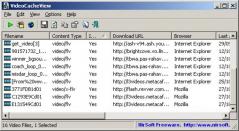
After watching a video in a Web site, you may want to save the video file into your local disk for playing it offline in the future. If the video file is stored in your browser's cache, this utility can help you to extract the video file from the cache and save it for watching it in the future.
It automatically scans the entire cache of Internet Explorer and Mozilla-based Web browsers (Including Firefox) and finds all video files that are currently stored in it. It allows you to easily copy the cached video files into another folder for playing/watching them in the future. If you have a movie player that is configured to play flv files, it also allows you to play the video directly from your browser's cache.
After the video list is displayed, you can use one of the following options, assuming that the video files are stored in the cache ('In Cache' = Yes):
· Play Selected File: Allows you to play the video file directly from the cache, assuming that you have a video player that is configured to play .flv files.
· Copy Selected Files To: Allows to copy the video files from the cache into another folder, so you will be able to play them in the future.
If you have a video file that is not stored in the cache ('In Cache' = No), you can use the 'Open Download URL In Browser' option (F8) in order to download the video file. You can also use the 'Copy Download URLs' option (Ctrl+U) to copy the download URLs to the clipboard, and then use then in your browser or in other download software.
Be aware that some Web sites may not allow you to download a video file in this way.
Nowadays most webpages use Flash video files (with the .flv extension) for playing video materials inside the website. VideoCacheView doesn't provide a build-in video player, but if you already have a video player that is configured to play .flv files, VideoCacheView will be able to use it for playing the video files directly from the Web browser's cache.
Extract Web site video files from the cache of your Web browser
After watching a video in a Web site, you may want to save the video file into your local disk for playing it offline in the future. If the video file is stored in your browser's cache, this utility can help you to extract the video file from the cache and save it for watching it in the future.
It automatically scans the entire cache of Internet Explorer and Mozilla-based Web browsers (Including Firefox) and finds all video files that are currently stored in it. It allows you to easily copy the cached video files into another folder for playing/watching them in the future. If you have a movie player that is configured to play flv files, it also allows you to play the video directly from your browser's cache.
After the video list is displayed, you can use one of the following options, assuming that the video files are stored in the cache ('In Cache' = Yes):
· Play Selected File: Allows you to play the video file directly from the cache, assuming that you have a video player that is configured to play .flv files.
· Copy Selected Files To: Allows to copy the video files from the cache into another folder, so you will be able to play them in the future.
If you have a video file that is not stored in the cache ('In Cache' = No), you can use the 'Open Download URL In Browser' option (F8) in order to download the video file. You can also use the 'Copy Download URLs' option (Ctrl+U) to copy the download URLs to the clipboard, and then use then in your browser or in other download software.
Be aware that some Web sites may not allow you to download a video file in this way.
Nowadays most webpages use Flash video files (with the .flv extension) for playing video materials inside the website. VideoCacheView doesn't provide a build-in video player, but if you already have a video player that is configured to play .flv files, VideoCacheView will be able to use it for playing the video files directly from the Web browser's cache.
VideoCacheView 2.10 is licensed as Freeware for the Windows operating system / platform. VideoCacheView is provided as a free download for all software users (Freeware).
VideoCacheView User Reviews (0)
No reviews yet, be the first to add a review and we'll give you some extra points.
VideoCacheView Related Searches
VideoCacheView Download Notice
VideoCacheView is periodically updated by FileCluster but you may encounter situations when the software informations are slightly out-of-date, the producers of VideoCacheView can modify the product without notifying us. VideoCacheView 2.10 is currently the last updated version of the software. All rights for VideoCacheView are belong to the developer, Nir Sofer.
Any form of support or software problems regarding VideoCacheView will be addressd to its developers. Please be aware that we do NOT provide VideoCacheView cracks, serial numbers, registration codes or any forms of pirated software downloads.
VideoCacheView Related Software
CryptLoad 1.1.8
Download from One-Click-Hosters like rapidshare.com and also from regular sites.
9 / 1,030
CooTub 1.0 Beta 1.0.0.20
CooTub- Free download web video from YouTube, Break, Metacafe, Revver, BlinkBox
7 / 90