Login
Opera Portable 11.61 Build 1250
-
License:
Freeware
-
Editors' Review:
Not yet reviewed
- User Reviews:
-
Video Review:
Video Not Available -
Updated:
Jan 26, 2012
- Publisher:
-
Platform:
Windows
- Category:
-
File size:
10.8 Mb
-
Downloads:
1,226
Opera Portable Description
Opera Portable - The portable version of Opera Browser
The portable version of the popular Opera Browser
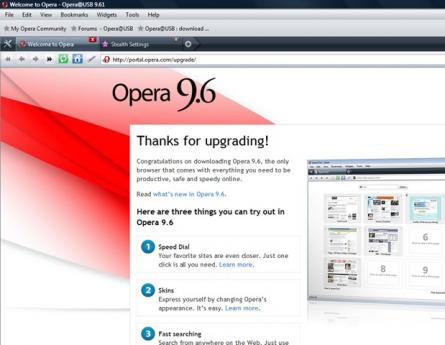
Opera@USB is the portable version of the popular Opera Browser.
The most full-featured Internet power tool on the market, Opera includes tabbed browsing, pop-up blocking, integrated searches andadvanced functions like Opera's groundbreaking e-mail program, RSS Newsfeeds and IRC chat. And because we know that our users have different needs, you can customize the look and content of your Opera browser with a few clicks of the mouse.
You want to use all Opera features mobile - no problem !
- there are no unwanted effects on IE or other browsers
- existing opera versions are also not affected
- make no entries to the registry
- leave no data on the guestcomputer
OperaUSB features:
- Speed Dial
Now you have a new way to access your favorite Web sites. Just open a new tab to get your Speed Dial. It's easy to populate and addictive to use.
- Fraud protection
Opera's advanced fraud protection protects you against web sites that try to steal your personal information. Watch the demo to learn how to enable this feature.
- BitTorrent
You don't need a separate BitTorrent application to download large files. Simply click a torrent link and start the download.
- Add your favorite search engines
Right-click on the site's search field and select "Create search" from the menu.
- Site preferences
Want to view a site in a different way or deny certain cookies? Want to block pop-ups on certain sites only? Right click and select "Edit site preferences".
- Widgets
Small Web applications (multimedia, newsfeeds, games and more) that make your desktop experience more fun. Use the Widgets menu to discover new widgets and access your favorites. Visit widgets.opera.com to learn more.
- Thumbnail preview
It is easy to have many tabs open at once in Opera. But exactly which tab had that video you wanted? Hover your mouse on any tab to see a thumbnail preview.
Requirements:
- a computer with an internet connection
- a USB-Stick / USB Flashdrive with about 8 MB space left
The portable version of the popular Opera Browser
Opera@USB is the portable version of the popular Opera Browser.
The most full-featured Internet power tool on the market, Opera includes tabbed browsing, pop-up blocking, integrated searches andadvanced functions like Opera's groundbreaking e-mail program, RSS Newsfeeds and IRC chat. And because we know that our users have different needs, you can customize the look and content of your Opera browser with a few clicks of the mouse.
You want to use all Opera features mobile - no problem !
- there are no unwanted effects on IE or other browsers
- existing opera versions are also not affected
- make no entries to the registry
- leave no data on the guestcomputer
OperaUSB features:
- Speed Dial
Now you have a new way to access your favorite Web sites. Just open a new tab to get your Speed Dial. It's easy to populate and addictive to use.
- Fraud protection
Opera's advanced fraud protection protects you against web sites that try to steal your personal information. Watch the demo to learn how to enable this feature.
- BitTorrent
You don't need a separate BitTorrent application to download large files. Simply click a torrent link and start the download.
- Add your favorite search engines
Right-click on the site's search field and select "Create search" from the menu.
- Site preferences
Want to view a site in a different way or deny certain cookies? Want to block pop-ups on certain sites only? Right click and select "Edit site preferences".
- Widgets
Small Web applications (multimedia, newsfeeds, games and more) that make your desktop experience more fun. Use the Widgets menu to discover new widgets and access your favorites. Visit widgets.opera.com to learn more.
- Thumbnail preview
It is easy to have many tabs open at once in Opera. But exactly which tab had that video you wanted? Hover your mouse on any tab to see a thumbnail preview.
Requirements:
- a computer with an internet connection
- a USB-Stick / USB Flashdrive with about 8 MB space left
Opera Portable 11.61 Build 1250 is licensed as Freeware for the Windows operating system / platform. Opera Portable is provided as a free download for all software users (Freeware).
Opera Portable User Reviews (0)
No reviews yet, be the first to add a review and we'll give you some extra points.
Opera Portable Related Searches
Opera Portable Download Notice
Opera Portable is periodically updated by FileCluster but you may encounter situations when the software informations are slightly out-of-date, the producers of Opera Portable can modify the product without notifying us. Opera Portable 11.61 Build 1250 is currently the last updated version of the software. All rights for Opera Portable are belong to the developer, John T. Haller.
Any form of support or software problems regarding Opera Portable will be addressd to its developers. Please be aware that we do NOT provide Opera Portable cracks, serial numbers, registration codes or any forms of pirated software downloads.
Opera Portable Related Software
WinWAP for Windows Mobile Professional 4.2.0.290
Mobile Internet (WAP) browser for Pocket PC
24 / 5,814