Login
Realtime Landscaping Pro 2013 8.15
-
License:
Demo ($99.95)
-
Latest Version:
2013 8.15
-
Editors' Review:
Not yet reviewed
-
Updated:
Apr 01, 2013
- Publisher:
-
Platform:
Windows
- Category:
- Subcategory:
-
File size:
199 Mb
-
Downloads:
1,352
Author's Description
Realtime Landscaping Pro - Design and visualize your landscaping ideas
This program helps you design and visualize your landscaping ideas
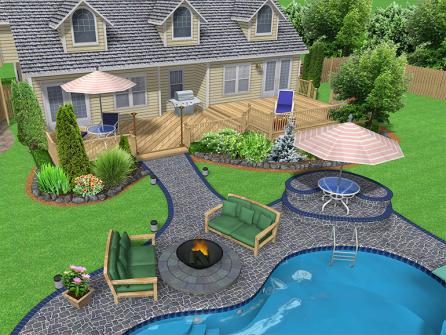
Realtime Landscaping Pro makes it easy to design and visualize your landscaping ideas. Creating 3D highly realistic walkthroughs of your proposals and design ideas is now easier with Realtime Landscaping Pro.
Design houses, decks, ground cover, patios, fencing, 3D plants, ponds, waterfalls, and much more. Freely walk around your designs in photo-realistic 3D, complete with lighting, shadows, flowing water - it's like you're really there. No prior CAD or architectural experience required.
Realtime Landscaping Pro features:
Advanced 3D Graphics Technology:
- Utilizing the latest advances in 3D graphics technology, our landscaping software helps you experience your landscape design ideas with surprisingly realistic lighting, shadows, flowing water, and other effects. You can walk through your landscape designs, just like in real life.
Use A Pre-Built House Or Design Your Own:
- Use the House Wizard to drop in a pre-built house, or create your own. Add houses simply by drawing their outline: the walls, trim, and even the roof are all created automatically.
- Easily add single and multi-story houses to your landscape design. Add doors, windows, porch lights, change the siding and roofing materials, select between gable and hip roof styles – all with just a few mouse clicks.
- Only the exterior of houses are modeled -- not the interior. This makes houses much easier to build and edit than traditional home design programs, and helps you focus on designing the landscape.
Add Plants, Trees, and Shrubs:
- The software includes over 4000 highly detailed plants, including trees, shrubs, flowers, water garden, cactus, palms, and more. Of these, 3600 are high resolution images of real plants, and 470 are detailed 3D models. Plant information includes common name, botanical name, planting zones, and size.
- Using the Plant Growth tool, you can preview what your landscape design will look like after a period of time: anywhere from three months to more than 20 years of growth.
Import Digital Photographs:
- All of the features of Realtime Landscaping Photo are included, so you can import a digital photograph of your house and design the surrounding landscape. All common image formats are supported, including JPG, BMP, PNG, and TGA. This is a fast and easy alternative to a full 3D design.
Swimming Pools and Spas:
- Drop in complete swimming pool designs using the wizard, or design your own from scratch. Add pool decking, change the coping and tile, set variable pool depths, create multilevel pools and decking, and much more. Pools and spas can be any shape and size. Above and below ground pools are supported. A complete set of pool accessories with diving boards, ladders, and lighting is also included.
Design a New Deck:
- The built-in deck designer makes it easy to create single and multi-level decks. Creating a deck is as simple as drawing its outline. The software automatically adds the boards, support posts, and railing. Curved deck, deck railing, and wrap-around stairs are also supported.
- Choose from a variety of decking materials including painted, stained, and natural wood styles.
Ponds, Waterfalls, Fountains, Streams:
- Design ponds by drawing their outline, which can be any shape or size. Choose the liner material, water depth, type of rocks surrounding the border, and more.
- Add waterfalls with a few mouse clicks. Water will flow realistically from the waterfall and into the pond, creating ripples where it lands. Use rockery to create custom spillways. Create cascading waterfalls, with the water flowing from one into the other. Pondless waterfalls can also be easily designed. These features are not currently found in other landscape design software.
- Choose between a wide array of fountain types: bell, cascade, tulip, pillar, and ornamental. Fountains can be placed stand-alone, in ponds, or on top of other fountains. You can even design your own fountains using rocks and other objects.
Limitations:
- Has only a small number of objects
This program helps you design and visualize your landscaping ideas
Realtime Landscaping Pro makes it easy to design and visualize your landscaping ideas. Creating 3D highly realistic walkthroughs of your proposals and design ideas is now easier with Realtime Landscaping Pro.
Design houses, decks, ground cover, patios, fencing, 3D plants, ponds, waterfalls, and much more. Freely walk around your designs in photo-realistic 3D, complete with lighting, shadows, flowing water - it's like you're really there. No prior CAD or architectural experience required.
Realtime Landscaping Pro features:
Advanced 3D Graphics Technology:
- Utilizing the latest advances in 3D graphics technology, our landscaping software helps you experience your landscape design ideas with surprisingly realistic lighting, shadows, flowing water, and other effects. You can walk through your landscape designs, just like in real life.
Use A Pre-Built House Or Design Your Own:
- Use the House Wizard to drop in a pre-built house, or create your own. Add houses simply by drawing their outline: the walls, trim, and even the roof are all created automatically.
- Easily add single and multi-story houses to your landscape design. Add doors, windows, porch lights, change the siding and roofing materials, select between gable and hip roof styles – all with just a few mouse clicks.
- Only the exterior of houses are modeled -- not the interior. This makes houses much easier to build and edit than traditional home design programs, and helps you focus on designing the landscape.
Add Plants, Trees, and Shrubs:
- The software includes over 4000 highly detailed plants, including trees, shrubs, flowers, water garden, cactus, palms, and more. Of these, 3600 are high resolution images of real plants, and 470 are detailed 3D models. Plant information includes common name, botanical name, planting zones, and size.
- Using the Plant Growth tool, you can preview what your landscape design will look like after a period of time: anywhere from three months to more than 20 years of growth.
Import Digital Photographs:
- All of the features of Realtime Landscaping Photo are included, so you can import a digital photograph of your house and design the surrounding landscape. All common image formats are supported, including JPG, BMP, PNG, and TGA. This is a fast and easy alternative to a full 3D design.
Swimming Pools and Spas:
- Drop in complete swimming pool designs using the wizard, or design your own from scratch. Add pool decking, change the coping and tile, set variable pool depths, create multilevel pools and decking, and much more. Pools and spas can be any shape and size. Above and below ground pools are supported. A complete set of pool accessories with diving boards, ladders, and lighting is also included.
Design a New Deck:
- The built-in deck designer makes it easy to create single and multi-level decks. Creating a deck is as simple as drawing its outline. The software automatically adds the boards, support posts, and railing. Curved deck, deck railing, and wrap-around stairs are also supported.
- Choose from a variety of decking materials including painted, stained, and natural wood styles.
Ponds, Waterfalls, Fountains, Streams:
- Design ponds by drawing their outline, which can be any shape or size. Choose the liner material, water depth, type of rocks surrounding the border, and more.
- Add waterfalls with a few mouse clicks. Water will flow realistically from the waterfall and into the pond, creating ripples where it lands. Use rockery to create custom spillways. Create cascading waterfalls, with the water flowing from one into the other. Pondless waterfalls can also be easily designed. These features are not currently found in other landscape design software.
- Choose between a wide array of fountain types: bell, cascade, tulip, pillar, and ornamental. Fountains can be placed stand-alone, in ponds, or on top of other fountains. You can even design your own fountains using rocks and other objects.
Limitations:
- Has only a small number of objects
Realtime Landscaping Pro 2013 8.15 is licensed as Demo for the Windows operating system / platform. Realtime Landscaping Pro is provided as a free to try download for all software users (Demo).
User Reviews (0)
No reviews yet, be the first to add a review and we'll give you some extra points.
Related Searches
Download Notice
Realtime Landscaping Pro is periodically updated by FileCluster but you may encounter situations when the software informations are slightly out-of-date, the developer can modify this product without notifying us. Version [2013 8.15] is currently the latest updated version of the software.
Any form of support or software problems will be addressd directly to its developers, Idea Spectrum. Please be aware that we do NOT provide Realtime Landscaping Pro cracks, serial numbers, registration codes or any forms of pirated software downloads.
Related Software