Login
CSVFileView 1.81
-
License:
Freeware
-
Latest Version:
1.81
-
Editors' Review:
Not yet reviewed
-
Updated:
Jun 12, 2013
- Publisher:
-
Platform:
Windows
- Category:
- Subcategory:
-
File size:
0.1 Mb
-
Downloads:
170
Author's Description
CSVFileView - CSV/Tab-delimited file viewer and converter.
CSV/Tab-delimited file viewer and converter.
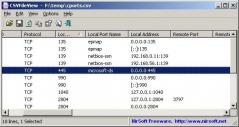
CSVFileView is a simple CSV file viewer/converter utility that allows you to easily view the content of CSV or tab-delimited file created by NirSoft utilities or by any other software, in a simple table viewer.
You will be able to sort the lines by one of the fields, to erase any unwanted fields or change their order, then save the result into another CSV file, XML file, tab-delimited file, or even an HTML report.
After opening the desired file, you can do the following actions:
- Sort the lines by one of the fields, simply by clicking the right column header. If the column values are numeric, CSVFileView automatically makes a numeric sorting instead of string sorting.
- Remove one or more columns or change their position by using the 'Choose Columns' window (F7). You can also change the position of the columns by dragging the column headers into another position.
- Select one or more lines, or select all lines (Ctrl+A), and then saving them into csv, comma-delimited, XML, or HTML file, by using the 'Save Selected Items' option (Ctrl+S). You can also press Ctrl+C to copy the selected lines into the clipboard, and then paste them into Excel.
CSV/Tab-delimited file viewer and converter.
CSVFileView is a simple CSV file viewer/converter utility that allows you to easily view the content of CSV or tab-delimited file created by NirSoft utilities or by any other software, in a simple table viewer.
You will be able to sort the lines by one of the fields, to erase any unwanted fields or change their order, then save the result into another CSV file, XML file, tab-delimited file, or even an HTML report.
After opening the desired file, you can do the following actions:
- Sort the lines by one of the fields, simply by clicking the right column header. If the column values are numeric, CSVFileView automatically makes a numeric sorting instead of string sorting.
- Remove one or more columns or change their position by using the 'Choose Columns' window (F7). You can also change the position of the columns by dragging the column headers into another position.
- Select one or more lines, or select all lines (Ctrl+A), and then saving them into csv, comma-delimited, XML, or HTML file, by using the 'Save Selected Items' option (Ctrl+S). You can also press Ctrl+C to copy the selected lines into the clipboard, and then paste them into Excel.
CSVFileView 1.81 is licensed as Freeware for the Windows operating system / platform. CSVFileView is provided as a free download for all software users (Freeware).
User Reviews (0)
No reviews yet, be the first to add a review and we'll give you some extra points.
Download Notice
CSVFileView is periodically updated by FileCluster but you may encounter situations when the software informations are slightly out-of-date, the developer can modify this product without notifying us. Version [1.81] is currently the latest updated version of the software.
Any form of support or software problems will be addressd directly to its developers, Nir Sofer. Please be aware that we do NOT provide CSVFileView cracks, serial numbers, registration codes or any forms of pirated software downloads.
Related Software
TI NoteFolio Creator 1.1.0.276
Create and transfer notes to and from graphing calculators to Microsoft Word files.
8 / 237
Word Count Mini 3.1.0.0
A tool to count words, lines, pages and characters in various types of documents.
1 / 58
XpressDox for Word 2010 (64 bit) 4.2
XpressDox Document Assembly for Word 2010 64-bit with OpenXML support
0 / 65
Xilisoft PDF to Word Converter 1.0.1.1019
Convert PDF to Word files with original structure and good quality remained.
1 / 66
Bookmark Docs 3.6.1
Bookmark Specific Places in Word, Excel, PowerPoint, CHM, PDF Docs, and Web Site
3 / 125