Choose Your Language: International US DE ES FR
Hello Guest Login Here or

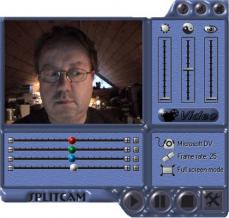
SplitCam 5.4.6.0

Author's Description

SplitCam - Your webcam can do more!

Your webcam can do more!

Usually, if you have a web camera or video camera connected to your computer, you cannot use it in more than one application at the same time, and there is no standard Windows options that makes it possible.

Split Camera driver lets you easily multiply your web-camera (any model), video cameras (any model: analog or digital : DV, VHS, TV-IN or TV-tunner ) in video chat or video conference software like ICQ, Yahoo Messenger, MSN Messenger, Skype, Camfrog, AOL AIM, PalTalk, or whatever... and to broadcast it to many users at a time.

With SplitCam you can connect up to 64 clients to a single video source. In a few words: Split Cam does just what its name says: it splits the video stream coming from the video source and tunnels it to numerous other client applications.

You can as well use splitcam to send your home videos at the same time to many video conference programs, for example your friend using MSN messenger can see your home video or your favorite DVD disk live and other friend uses Yahoo messenger want to see it too so how can you at the same time to send it to both of them and to see it on your computer as well?

Splitcam allow this operation to happen, you can watch the video file and at the same time to send it over the internet to any video chat or video conferencing software, we are the only software on the net that allow it.

SplitCam features :

Cool webcam effects:
- Add our effects to your webcam video in video chat and have fun with your friends! It’s a real positive emotions source!

Video splitting to several programs:
- Feel free to use your webcam in several applications without receiving “webcam busy” error. Believe your webcam can do more!

All popular services support:
- Skype, Windows Live Messenger, Yahoo messenger, AOL AIM, ICQ, Camfrog, Gtalk, YouTube, ooVoo, and more…

Different video stream sources:
- With SplitCam you can stream webcam, video file, slideshow and desktop (full desktop or selected part of it)!

Useful little video features:
- Record your video without special professional software and upload it to YouTube in a few clicks directly from SplitCam window!

Zoom video feature:
- Zoom your video in SplitCam and stream only needed part of it. Zooming with keyboard and with mouse available.

Requirements:

- Intel Celeron 1GHz or higher
- 256 RAM
- DirectX 9.0
- Webcam

SplitCam 5.4.6.0 is licensed as Freeware for the Windows operating system / platform. SplitCam is provided as a free download for all software users (Freeware).

User Reviews (0)

No reviews yet, be the first to add a review and we'll give you some extra points.
Download Notice
SplitCam is periodically updated by FileCluster but you may encounter situations when the software informations are slightly out-of-date, the developer can modify this product without notifying us. Version [5.4.6.0] is currently the latest updated version of the software.

Any form of support or software problems will be addressd directly to its developers, SplitCam LLC. Please be aware that we do NOT provide SplitCam cracks, serial numbers, registration codes or any forms of pirated software downloads.
Related Software
iWOW 1.00
The ultimate iTunes audio plug-in for Mac.
1 / 1,015
Beyond TV Link 4
Access Beyond TV 3.5 from other PCs
3 / 313
Keep Track 3.8.5
A powerful music organiser and player
1 / 123
Text-To-VoIP Plug-In for MorphVOX Pro 4.0.0
Talk over Internet, Soft-Phone Text-to-Speech
1 / 339
Audio Producer 2006.8.1
Very easy to use audio editor.
6 / 396
Audiobook Recorder 1.27
Friendly text to audiobook (mp3) converter.
3 / 302
LBE Find and Replace for MS Outlook 3.1.4
Search and replace in Outlook Contacts, Emails, Appointments, Notes and Tasks
1 / 80
Playlist Magic Copy 1.0
Copy files from playlist, to common folder.
1 / 314
MP3 Surgeon 2003 Lite
Visual MP3 editor with Normalisation support.
1 / 230
PowerMockup 3.1.2
Toolset for creating mockups/wireframes of user interfaces in PowerPoint.
0 / 70