Login
MusicBee 2.0.4663
-
License:
Freeware
-
Latest Version:
2.0.4663
-
Editors' Review:
Not yet reviewed
-
Updated:
Oct 16, 2012
- Publisher:
-
Platform:
Windows
- Category:
- Subcategory:
-
File size:
25.4 Mb
-
Downloads:
386
Author's Description
MusicBee - Organize, find and play music files
Organize, find and play music files on your computer, on portable devices and on the web
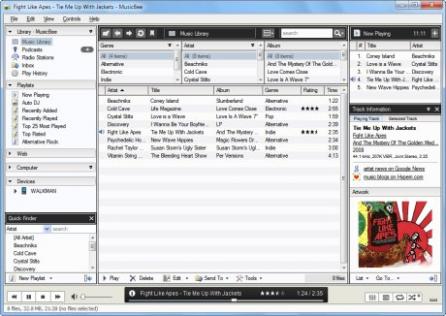
If you are looking for an application geared toward managing extensive music collections, easy to use and with a comprehensive feature set - MusicBee is that application.
The MusicBee application provides an easy way to organize, find and play music files on your computer, on portable devices and on the web.
NOTE:
Free for personal use
MusicBee features :
- Manage your music
- Manage your music as a library, as playlists or as folders on the file-system. Organize, browse and find music on your computer, on portable devices and on the web. Small or large collections are handled with ease.
- Have folders watched for new tracks and added to your library, with the option to tag the files from an Inbox beforehand.
- Also manage and download Podcast subscriptions and listen to your favourite radio stations, including Shoutcast and Last.fm stations.
- Tagging
- Tag music easily, with a large number of tags available for editing, and custom tags that can be configured to edit other less common tags.
- Automatically look up missing Album Art, Lyrics and tag other metadata from the web, with the ability to have tracks identified by analysing their digital sound signature.
- Power users will appreciate the configurable input panel layout, bulk editing, handling for multiple artist/ genres, search & replace, and tools to highlight tracks requiring attention (missing tags, duplicates, etc).
- Organise
- Have music files organised and renamed into folders and files on your computer based on tag values such as artist, album, name, track number, etc. that you specify. You can have MusicBee do this automatically for all files in your library or you can choose the files or folders yourself.
- Play and Discover Music
- Play MP3, FLAC, Vorbis, WMA and other formats and optionally have those tracks scrobbled to Last.fm. You are not restricted to music files on your computer - you can play the web as well. Playlists are automatically created from MP3 blogs and web pages you visit.
- Discover music with the Auto-DJ and have it create a playlist for you based on criteria you specify, such as tracks from similar artists, or include music tracks from the web not in your collection (or old ones from your collection you have forgotten about!)
- You can also create playlists that are dynamically updated based on your own rules, such as tracks with the same mood or genre.
- Secure CD Ripping
- Securely rip tracks from your CD collection as individual files or as a single album file with an embedded cuesheet. You can also have your rips validated against AccurateRip.com for extra assurance.
- No need to manually tag your rips - tags and artwork for each CD are automatically retrieved from the internet, with the option to have your ripped tracks added to the Inbox for further tagging before adding to your library.
- Synchronise
- Synchronise music files, podcasts and playlists from your library, or music files from any folder to many portable devices. These include iPods (but not iTouch/ iPhone 2.0+), MTP devices (most portable devices other than iPods), and USB devices. You can also drag and drop files to the device yourself.
- Artwork, tags, ratings and playcounts are all synchronised, with the option to add the track playcounts from the device to your Last.fm library.
- Files can be encoded to a format supported by the device on the fly. And you have the option to normalise tracks so they play back at the same volume.
- Tools
- Convert music files from one format to another without losing tag values; normalise the volume of your files so you don't have to keep adjusting the volume; update missing tags and album artwork from the web; and more.
Organize, find and play music files on your computer, on portable devices and on the web
If you are looking for an application geared toward managing extensive music collections, easy to use and with a comprehensive feature set - MusicBee is that application.
The MusicBee application provides an easy way to organize, find and play music files on your computer, on portable devices and on the web.
NOTE:
Free for personal use
MusicBee features :
- Manage your music
- Manage your music as a library, as playlists or as folders on the file-system. Organize, browse and find music on your computer, on portable devices and on the web. Small or large collections are handled with ease.
- Have folders watched for new tracks and added to your library, with the option to tag the files from an Inbox beforehand.
- Also manage and download Podcast subscriptions and listen to your favourite radio stations, including Shoutcast and Last.fm stations.
- Tagging
- Tag music easily, with a large number of tags available for editing, and custom tags that can be configured to edit other less common tags.
- Automatically look up missing Album Art, Lyrics and tag other metadata from the web, with the ability to have tracks identified by analysing their digital sound signature.
- Power users will appreciate the configurable input panel layout, bulk editing, handling for multiple artist/ genres, search & replace, and tools to highlight tracks requiring attention (missing tags, duplicates, etc).
- Organise
- Have music files organised and renamed into folders and files on your computer based on tag values such as artist, album, name, track number, etc. that you specify. You can have MusicBee do this automatically for all files in your library or you can choose the files or folders yourself.
- Play and Discover Music
- Play MP3, FLAC, Vorbis, WMA and other formats and optionally have those tracks scrobbled to Last.fm. You are not restricted to music files on your computer - you can play the web as well. Playlists are automatically created from MP3 blogs and web pages you visit.
- Discover music with the Auto-DJ and have it create a playlist for you based on criteria you specify, such as tracks from similar artists, or include music tracks from the web not in your collection (or old ones from your collection you have forgotten about!)
- You can also create playlists that are dynamically updated based on your own rules, such as tracks with the same mood or genre.
- Secure CD Ripping
- Securely rip tracks from your CD collection as individual files or as a single album file with an embedded cuesheet. You can also have your rips validated against AccurateRip.com for extra assurance.
- No need to manually tag your rips - tags and artwork for each CD are automatically retrieved from the internet, with the option to have your ripped tracks added to the Inbox for further tagging before adding to your library.
- Synchronise
- Synchronise music files, podcasts and playlists from your library, or music files from any folder to many portable devices. These include iPods (but not iTouch/ iPhone 2.0+), MTP devices (most portable devices other than iPods), and USB devices. You can also drag and drop files to the device yourself.
- Artwork, tags, ratings and playcounts are all synchronised, with the option to add the track playcounts from the device to your Last.fm library.
- Files can be encoded to a format supported by the device on the fly. And you have the option to normalise tracks so they play back at the same volume.
- Tools
- Convert music files from one format to another without losing tag values; normalise the volume of your files so you don't have to keep adjusting the volume; update missing tags and album artwork from the web; and more.
MusicBee 2.0.4663 is licensed as Freeware for the Windows operating system / platform. MusicBee is provided as a free download for all software users (Freeware).
User Reviews (0)
No reviews yet, be the first to add a review and we'll give you some extra points.
Related Searches
Download Notice
MusicBee is periodically updated by FileCluster but you may encounter situations when the software informations are slightly out-of-date, the developer can modify this product without notifying us. Version [2.0.4663] is currently the latest updated version of the software.
Any form of support or software problems will be addressd directly to its developers, Steven Mayall. Please be aware that we do NOT provide MusicBee cracks, serial numbers, registration codes or any forms of pirated software downloads.
Related Software
RockBox Jukebox 3.0
Retro, diner styled MP3 jukebox software, that works great in a rental kiosk
2 / 65
MPlayer for Windows Full Package 2013-04-14 Build 115
The award-winning OpenSource Media Player is now available for Windows
39 / 2,666
Back-Stage Digital Track Performer 1.0.0.0
Back-Stage Digital Track is an advanced audio player with special features
1 / 100