Login
Network Monitoring Tools Package 2.10
-
License:
Freeware
-
Latest Version:
2.10
-
Editors' Review:
Not yet reviewed
-
Updated:
May 15, 2012
- Publisher:
-
Platform:
Windows
- Category:
- Subcategory:
-
File size:
1.15 Mb
-
Downloads:
81
Network Monitoring Tools Package Description
Network Monitoring Tools Package - Package of network monitoring tools for Windows
This software was created to offer you the possibility to easily erase all the dupes from your computer.
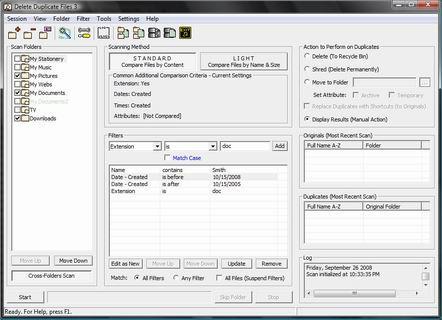
Delete Duplicate Files is a tool for deleting duplicated files from the hard drives.
Comparing large number of files by content is the kind of operation that may require considerable amount of system resources.
Use Resources Consumption settings to tweak that usage so it can blend nicely into your current system environment.
Process Priority:
To increase the amount of CPU time dedicated to Delete Duplicate Files increase the Process Priority Class to High or Real-time.
Threads Priority:
To increase the amount of CPU time dedicated to individual threads increase the Process Priority Class to High or Real-time.
Scanning Speed:
Set scanning speed to Slow if you want Delete Duplicate Files to give more of it's (system assigned) CPU time to other applications (and run slower scans), or to Fast to have it consume 90% (and more) of available system CPU time (and run faster scans). If you plan to extensively use other applications while the scan is in progress, set scanning speed to Slow or Moderate.
Maximum Number of Concurrent Threads:
Large number of concurrent threads speeds up the operations but increases the memory consumption. If current operations consume too much or your available working memory lower down this number. If you have plenty of working memory set it to the max.
Commit Memory Regions Dynamically:
Adjust how much the swap file should be expanded during the scanning operations. If the swap file size is an issue set to Off.
Delete Duplicate Files features :
Two major scanning methods:
- Standard & Light.
- Standard Method: Compare files by content (byte-for-byte or CRC32 matches).
- Light Method: Compare files by name and size.
- Variety of additional comparison criteria.
- Variety of additional actions.
- Scan sub-folders option.
- Cross-folders scan option.
- Lock-folders option.
- Filters.
- Originals-Detection Rules.
- ctions to perform on duplicates: Delete, Wipe & Move.
- Comprehensive results overview.
- User friendly and intuitive graphical interface.
- Powerful performances.
- Logging.
Limitations:
- Can only identify the duplicate files, move and delete functions are disabled
This software was created to offer you the possibility to easily erase all the dupes from your computer.
Delete Duplicate Files is a tool for deleting duplicated files from the hard drives.
Comparing large number of files by content is the kind of operation that may require considerable amount of system resources.
Use Resources Consumption settings to tweak that usage so it can blend nicely into your current system environment.
Process Priority:
To increase the amount of CPU time dedicated to Delete Duplicate Files increase the Process Priority Class to High or Real-time.
Threads Priority:
To increase the amount of CPU time dedicated to individual threads increase the Process Priority Class to High or Real-time.
Scanning Speed:
Set scanning speed to Slow if you want Delete Duplicate Files to give more of it's (system assigned) CPU time to other applications (and run slower scans), or to Fast to have it consume 90% (and more) of available system CPU time (and run faster scans). If you plan to extensively use other applications while the scan is in progress, set scanning speed to Slow or Moderate.
Maximum Number of Concurrent Threads:
Large number of concurrent threads speeds up the operations but increases the memory consumption. If current operations consume too much or your available working memory lower down this number. If you have plenty of working memory set it to the max.
Commit Memory Regions Dynamically:
Adjust how much the swap file should be expanded during the scanning operations. If the swap file size is an issue set to Off.
Delete Duplicate Files features :
Two major scanning methods:
- Standard & Light.
- Standard Method: Compare files by content (byte-for-byte or CRC32 matches).
- Light Method: Compare files by name and size.
- Variety of additional comparison criteria.
- Variety of additional actions.
- Scan sub-folders option.
- Cross-folders scan option.
- Lock-folders option.
- Filters.
- Originals-Detection Rules.
- ctions to perform on duplicates: Delete, Wipe & Move.
- Comprehensive results overview.
- User friendly and intuitive graphical interface.
- Powerful performances.
- Logging.
Limitations:
- Can only identify the duplicate files, move and delete functions are disabled
Network Monitoring Tools Package 2.10 is licensed as Freeware for the Windows operating system / platform. Network Monitoring Tools Package is provided as a free download for all software users (Freeware).
Network Monitoring Tools Package User Reviews (0)
No reviews yet, be the first to add a review and we'll give you some extra points.
Network Monitoring Tools Package Download Notice
Network Monitoring Tools Package is periodically updated by FileCluster but you may encounter situations when the software informations are slightly out-of-date, the producers of Network Monitoring Tools Package can modify the product without notifying us. Network Monitoring Tools Package 2.10 is currently the last updated version of the software. All rights for Network Monitoring Tools Package are belong to the developer, NirSoft Network Tools.
Any form of support or software problems regarding Network Monitoring Tools Package will be addressd to its developers. Please be aware that we do NOT provide Network Monitoring Tools Package cracks, serial numbers, registration codes or any forms of pirated software downloads.
Network Monitoring Tools Package Related Software
MAXsecure AntiVirus 2010 - free Download 1.0123
MAXsecure AntiVirus 2010 - Maximum security
2 / 2,504
SafenSoft SysWatch Deluxe 3.6
Proactive protection with sandboxing & built-in antivirus ensures PC integrity
1 / 244
Coranti 2010 MultiCore AntiVirus AntiSpyware 1.0.42
4-engine protection from viruses and spyware
2 / 141